Geometry nodes: Dot product & angle between vectors
Dot product
Like the cross product, the dot product is an operation on two vectors. Unlike the cross product, it produces a scalar (float).
In geonodes, the dot product is primarily a way to tell how closely two vectors are aligned. And if both input vectors are normalized, the output value is trivial to work with1: from -1.0 (exact opposites), to 1.0 (exactly parallel) with 0.0 meaning they're orthogonal.
Angle between vectors
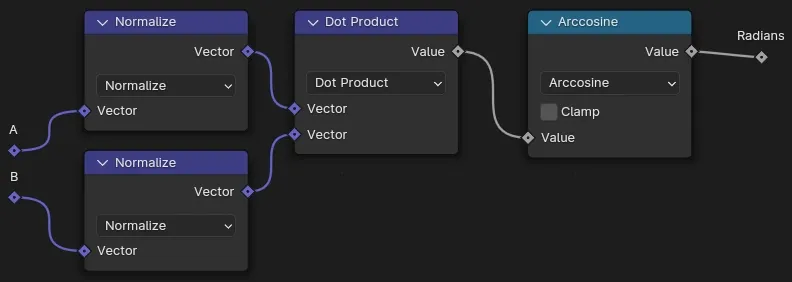
Actually the dot product of normalized vectors is just the cosine of the angle between them. So we can easily calculate the angle in degrees/radians from that.
Note! The vectors from sampling e.g. curve and surface normals & tangents are already normalized! So they can be plugged straight in to the dot product Vector Math node.
A little algebra to explain how normalizing gets us the simplified output range:
Divide by the magnitudes of both vectors:
If and are normalized1, their magnitude ('norm') is 1, so the denominator disappears.
And
So the dot product is a really useful way to tell if things are oriented one way or another, at what angle, and hence whether to flip or rotate them, or add a or two here or there.
And AFAIK, if they're not, it's not.↩